Cloud digital signage · Launching soon
One place to control every screen in your business.
Schools
Bell schedules, lunch menus, and a message that reaches every hallway at once when it has to.
Doctors' offices
Wait times and patient info in a room nobody has to hunt for a remote to change.
Restaurants
Menu boards that switch with the daypart instead of with a printer and a stepladder.
Retail & gyms
Promos and class schedules rolled out across every location from one browser tab.
Or take them all over.
Weather closing, a lockdown, a live stream — interrupt every screen in the building instantly, then hand them back to their schedules.
Setup
Three steps. No truck roll.
A screen goes live in about the time it takes to find the HDMI port — no media player, no proprietary digital signage hardware to buy.
Plug in a player
A Fire TV Stick into any TV, monitor, or projector — about $30. Raspberry Pi and other players are next. Existing screens work; nothing to rip out.
Scan the code
The screen shows a pairing code. Scan it with your phone and the device lands in your account, named and ready to assign — whatever hardware it runs on.
Publish
Drop in images and video, choose a screen or a whole location, and publish. Devices pick it up on check-in, or right away when you push.
The console
Every screen you run, in one browser tab.
Locations on the left, fleet health in the middle. See what's online, what's stuck without a template, and what went dark two hours ago — then fix it without leaving the page.
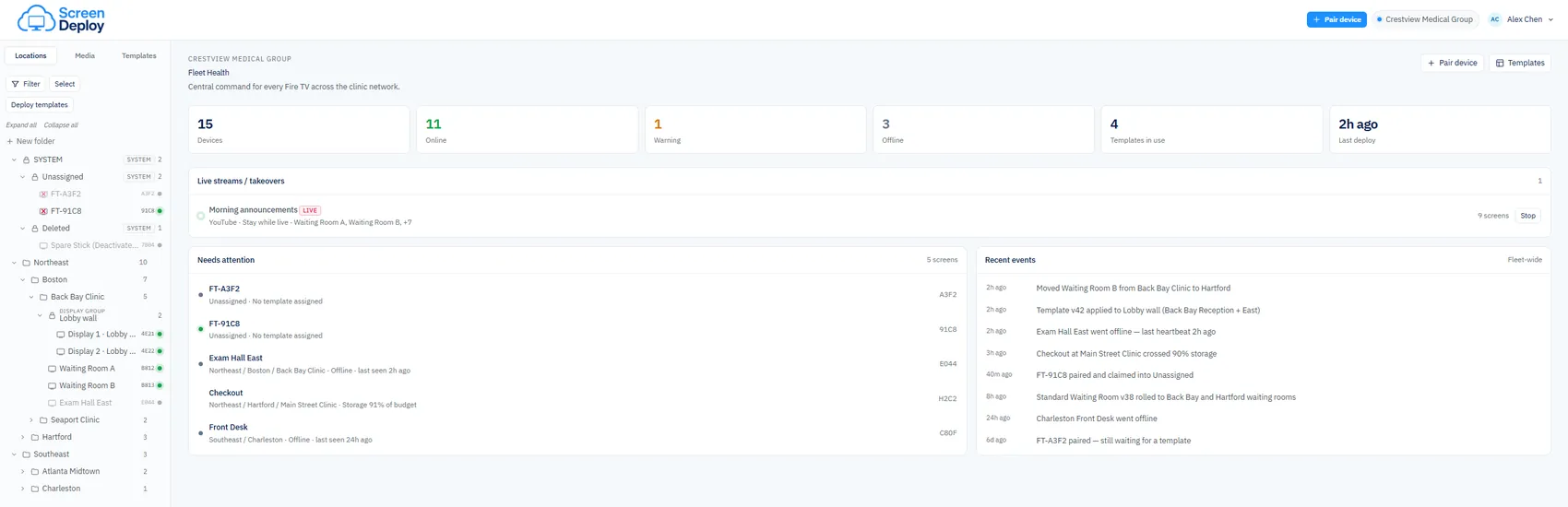
Push a stream or an urgent message over whatever's playing, on any group of screens. Everything returns to its schedule the moment you stop.
Who paired what, which template went where, and exactly when a screen stopped reporting in — timestamped, fleet-wide, and exportable.
Console in development · Screens shown are sample data
Local caching
Your Wi-Fi barely notices.
Unlike streaming-based digital signage, every image and video downloads to the device before it ever plays. Screens run from local storage — so playback doesn't stutter when the network gets busy, and it keeps playing when the internet doesn't.
Hourly check-in · Instant push when you need it
Early access
Signup form didn't load — an ad blocker may be blocking it. Email hello@screendeploy.com and we'll add you.